HOW TO CHECK-IN
With a wide variety of properties managed by Lake Erie Vacation Rentals, Inc., you might think that check-in is difficult. However, it's not, as every rental property has the same easy to follow check-in process.
- ARRIVAL INFO e-mail
- RENTAL OFFICE / LOCKBOX assignment
- ARRIVAL PACKET pick-up
1. ARRIVAL INFO e-mail: A few days prior to your scheduled arrival date you will receive an e-mail with the subject: ARRIVAL INFO. This e-mail will provide you with:
-The address of our Rental Office (as well as turn-by-turn directions from the S.R. 2 / S.R. 163 interchange located on the east side of Port Clinton).
-Location of arrival LOCKBOXES
-Assignment of a LOCKBOX
-Info on how to access the LOCKBOX
Typically, arrivals on Fri, Sat, Sun will receive the ARRIVAL INFO e-mail the Monday prior to their arrival; Arrivals on Mon, Tues, Wed, Thurs will receive the ARRIVAL INFO e-mail the Thursday prior to their arrival. Be sure to check your SPAM folder (guests booking through a third-party OTA (booking.com / VRBO.com / etc.) may also want to check the “messages” folder located in your OTA account. We recommend that you make every effort to locate your ARRIVAL INFO e-mail prior to your scheduled arrival date.
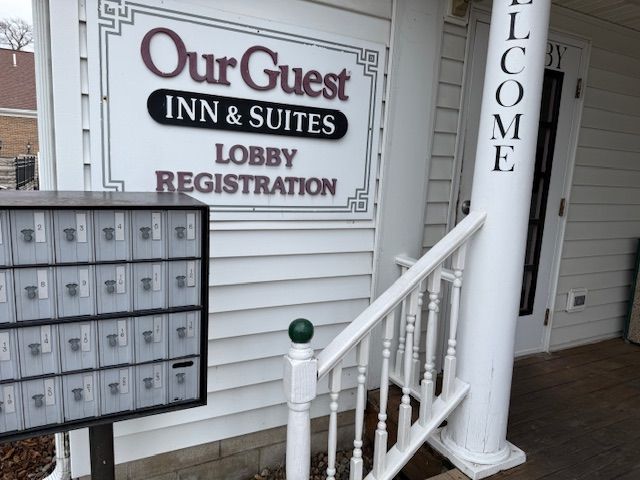
2. RENTAL OFFICE / LOCKBOX assignment: The LEVR Rental Office is located at 220 E. Perry Street, Port Clinton, OH 43452. This address will take you to the OurGuest Inn & Suites - Downtown Port Clinton (LEVR Offices are inside the hotel). Just before stepping on to the front porch of the OurGuest Inn & Suites you'll find a cluster of LOCKBOXES on your left. The ARRIVAL INFO e-mail will provide you with your LOCKBOX assignment and provide instructions on how to open the LOCKBOX.
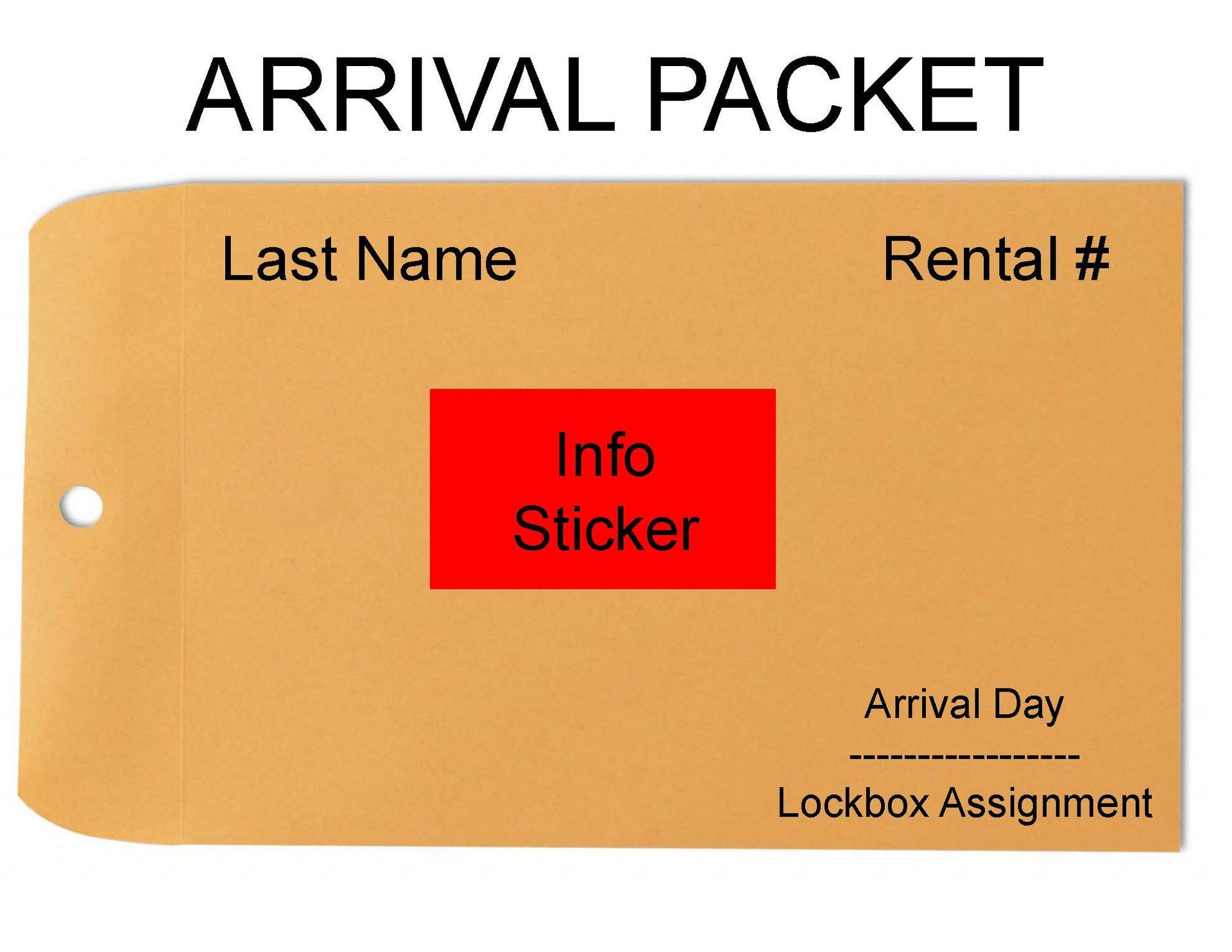
3. ARRIVAL PACKET PICK-UP: Please look for the following on your arrival packet before departing the rental office:
- Last Name – Sounds obvious but make sure you have the correct ARRIVAL PACKET. Check that the name on the arrival packet matches your driver’s license!
- RENTAL # - This will reflect the rental (or in some cases rental(s)) you have reserved.
- Arrival Day / Lockbox Assignment – This is our way of organizing arrivals for a given day and knowing which lockbox to place the arrival packet.
- Info Sticker – This information is specific to the rental(s) and may contain information such as WiFi passwords, gate codes, elevator codes, garage door codes, entry door code, etc. When no codes needed and when the WiFi password is posted on the refrigerator in the rental this sticker will simply have an “X”.